tools
Cursor
Cursor is an AI code editor that helps developers understand, write, test, review, and manage software.
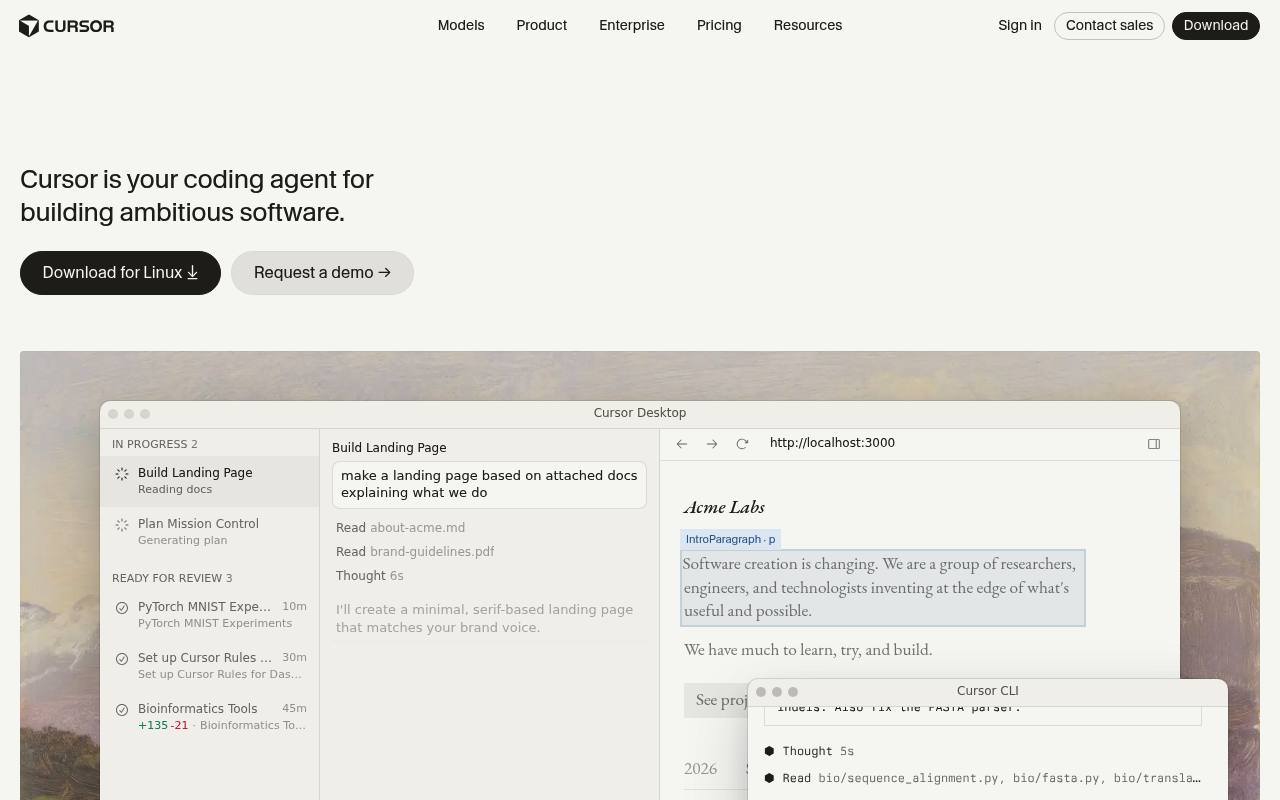
Cursor combines a code editor with AI agents that can search codebases, edit files, run terminal commands, use tools, and work on tasks in the cloud. It supports local and cloud agents, parallel subagents, code review, plugins, skills, MCP connections, and visual editing.
Developers and software teams use it for planning features, debugging, migrations, testing, pull requests, and codebase maintenance. A free Hobby plan is available; paid plans include usage limits, while additional model usage and Bugbot reviews can incur usage-based charges.
Features
- Predicts and applies the next code edit with Tab completion
- Plans and executes coding tasks with local and cloud agents
- Searches large codebases with Instant Grep
- Runs terminal commands, builds, tests, and installs in a sandbox
- Uses parallel subagents with different models
- Supports plugins, skills, and MCP connections
- Reviews pull requests and helps fix code issues
- Includes an integrated browser and visual design mode
Use cases
- Plan and implement features across multiple files
- Debug applications using execution data and screenshots
- Generate tests and run builds from the editor
- Review pull requests and address automated feedback
- Run long coding tasks with cloud agents
- Apply team conventions with rules, skills, and plugins
Pros
Cons
Latest updates
- Agent SDK
The Agent SDK allows you to define an agent as a folder of code, test it with evals, and deploy it to Cursor or your own infrastructure.
- Cloud Agent Canvases and Environment Improvements
Cloud agents can now build canvases; the Environments API creates and manages cloud environments; environments support up to 300 repositories.
- Origin App Marketplace
Origin integrates with over 20 apps, and the marketplace is open to public submissions.
- Remote control for local agents
You can now see and reply to agents running on your computer from the Cursor iOS app.
- Rollouts and Security Review
Rollouts watches every change as it deploys and reports its health per environment; Security Review reports bugs on every pull request.
Capabilities
- Inline completion — “autocompletes when and where you need it to” source
- Agent that edits files — “For complex tasks, Cursor asks clarifying questions, builds a plan, then executes in the background.” source
- Knows the whole codebase — “Designed for large codebases, Cursor uses Instant Grep to search millions of files in milliseconds.” source
- Runs commands — “Run shell commands directly from Cursor, from builds to tests to installs.” source
- Reviews pull requests — “Cursor runs in your terminal, collaborates in Slack, and reviews PRs in GitHub.” source
- JetBrains IDEs — “Start agents from GitHub, Slack, Linear, JetBrains IDEs, and more.” source
- Command line — “Run agents in any terminal, script, or editor.” source
- Choice of models — “Choose between every cutting-edge model from OpenAI, Anthropic, Gemini, SpaceXAI, and Cursor.” source
- No code retained — “Privacy mode can be enabled in settings or by a team admin.” source
Get it
Security
- SOC 2 Type II — “Cursor holds AIUC-1, ISO/IEC 27001:2022, and ISO/IEC 42001:2023 certifications, along with a SOC 2 Type II attestation.” source
- SOC 2 — “Cursor holds AIUC-1, ISO/IEC 27001:2022, and ISO/IEC 42001:2023 certifications, along with a SOC 2 Type II attestation.” source
- ISO 27001 — “Cursor holds AIUC-1, ISO/IEC 27001:2022, and ISO/IEC 42001:2023 certifications, along with a SOC 2 Type II attestation.” source
- ISO 42001 — “Cursor holds AIUC-1, ISO/IEC 27001:2022, and ISO/IEC 42001:2023 certifications, along with a SOC 2 Type II attestation.” source
- Not trained on your data — “When enabled, we will not train on your data.” source
Pricing
- Starting price
- $8/mo
- Prices checked
- 2026-11-05
Free
Free
- Limited AI usage
- Limited agent requests
- Limited Chat requests
- Post, reply, and follow
Plus
- $8 /month
- Shared AI usage pool
- Grok Chat, Voice, Imagine, and Build
- Grok API access
- Premium checkmark
- Less timeline ads
- Enhanced creator tools
Premium
- $30 /month
- 4x more usage compared to Plus
- Latest Grok models
- Cloud agents & automations
- Code hosting & AI code reviews
- Third-party models at API list price
- Grok Bot
Super
- $100 /month
- 15x more usage compared to Plus
- Priority model access at peak times
- Everything in Premium
Ultra
- $200 /month
- 50x more usage compared to Plus
- Earliest access to all products & models
- Everything in Super
Teams
- $30 +/user/month
- Pooled usage
- Centralized billing and administration
- Usage analytics
- Team-wide privacy settings
- SAML/OIDC SSO
- Mix and match seat types
Enterprise
Price on request
- Pooled usage
- Invoice/PO billing
- SCIM seat management
- Granular spend controls
- Audit logs and service accounts
- Priority support